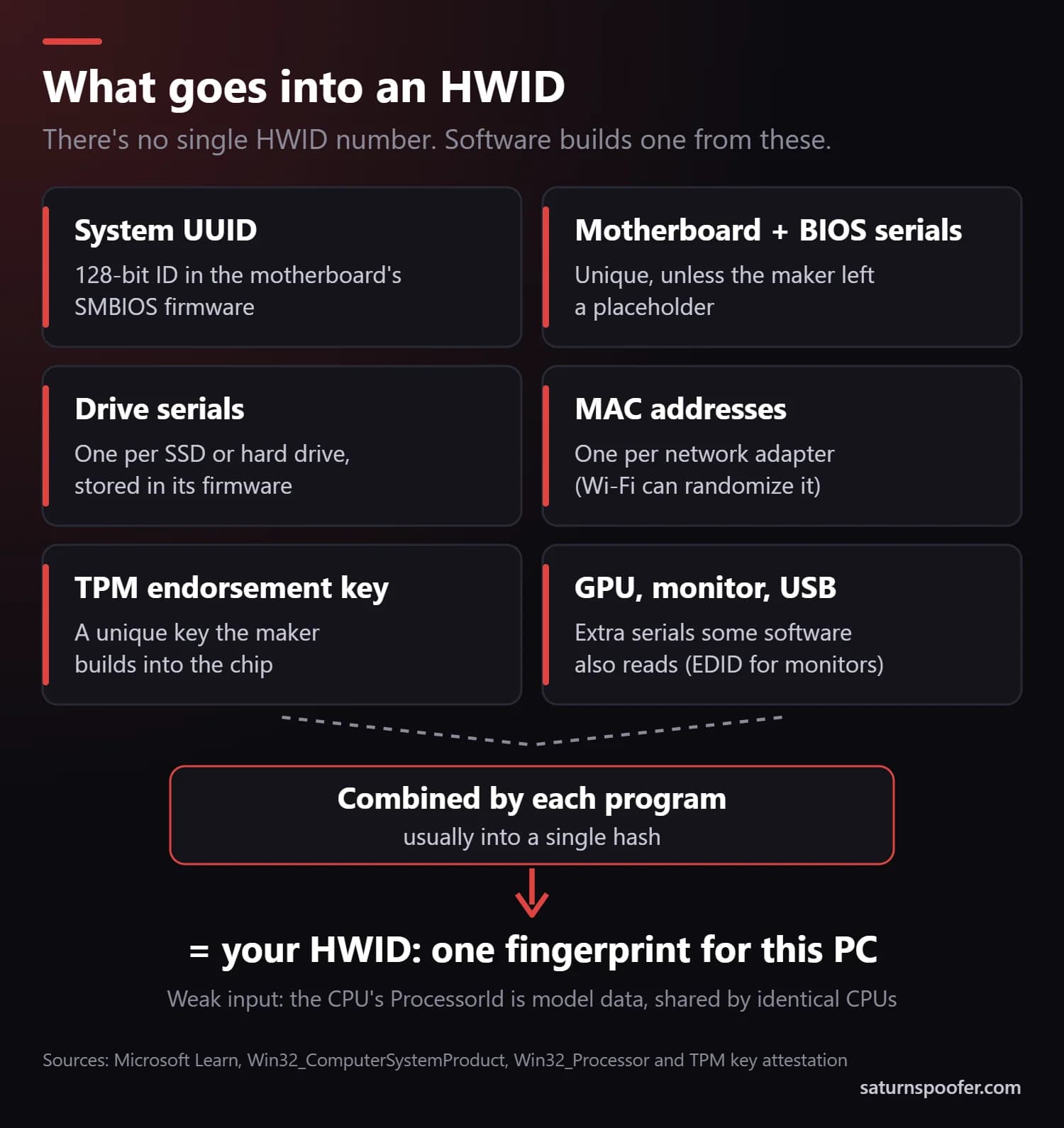
HWID, short for hardware ID, is the fingerprint software builds from the serial numbers inside your computer: the 128-bit system UUID in the motherboard's firmware, the serials of your drives, your network adapters' MAC addresses and the unique key in the TPM security chip. No single "HWID number" is stored anywhere. Each program that needs one reads its own mix of those identifiers and combines them, usually into a hash.
With no single number to look up, a lot of "find your HWID" advice ends up pointing at the wrong thing. Much of it also still leans on the WMIC tool, which Windows 11 versions 24H2 and 25H2 stopped including in August 2026.
What Does HWID Mean?
HWID stands for hardware ID, or hardware identification: the identifiers a program reads from your computer's components to recognize that exact machine. The term turns up in three places. Game anti-cheat systems use an HWID to ban a PC instead of an account. Some software sellers lock a license key to one computer's HWID, which is what an "HWID lock" means. And Windows 11 applies the same idea to its own digital license, which it associates with your device's hardware.
Windows also uses "hardware ID" for something else entirely: the device model strings listed in Device Manager. Those are not a machine fingerprint, and several popular HWID guides mix the two up (more on that below).
What Makes Up Your HWID?
An HWID is made of serial numbers and unique keys stored in your PC's firmware and hardware, read one at a time and then combined. Each program picks its own mix, but the same handful of identifiers comes up again and again.
| Identifier | Where it's stored | How unique it is |
|---|---|---|
| System UUID | Board firmware (SMBIOS) | 128-bit, meant to be unique |
| Board and BIOS serials | Board firmware | Unique, if the maker filled it in |
| Drive serials | Each SSD or hard drive | One per drive |
| MAC address | Each network adapter | One per adapter |
| TPM key | The TPM security chip | One per chip |
| CPU ID | The processor | Shared by identical models |
The system UUID is the anchor. Microsoft's documentation for the Win32_ComputerSystemProduct class describes it as a 128-bit identifier taken from the System Information record in the motherboard's SMBIOS data, the standard firmware tables that describe a PC's hardware. Drive serials sit in each drive's own firmware, and every TPM ships with a unique endorsement key that the manufacturer builds in, according to Microsoft's TPM key attestation guide.
Two of these are weaker than they look. Windows' ProcessorId value describes the processor's model and feature flags rather than a serial, so two identical CPUs report the same one. Motherboard serials are only as good as the manufacturer made them. On the Windows 11 PC we tested in September 2026, the BIOS serial read "To be filled by O.E.M.", a placeholder nobody ever filled in. That's why HWID systems combine several identifiers instead of trusting one. Software on the PC can also read serial numbers from the graphics card, the monitor's EDID data and connected USB devices.
Is the Hardware ID in Device Manager Your HWID?
No. The Hardware Ids entry in Device Manager is a device model code, not a machine identifier. Microsoft's hardware ID documentation describes these as vendor-defined strings Windows uses to pick the right driver package for a device. Drivers are written for a product model, so identical devices carry the same hardware ID. It's an easy mix-up, since both things go by "hardware ID".
Microsoft's own example is a PCI device ID that begins PCI\VEN_1000&DEV_0001 and continues with subsystem and revision codes. In the PCI ID format, VEN is the four-character code the PCI-SIG assigns to the vendor and DEV is the vendor's own code for the chip. Nothing in that string belongs to your PC alone.
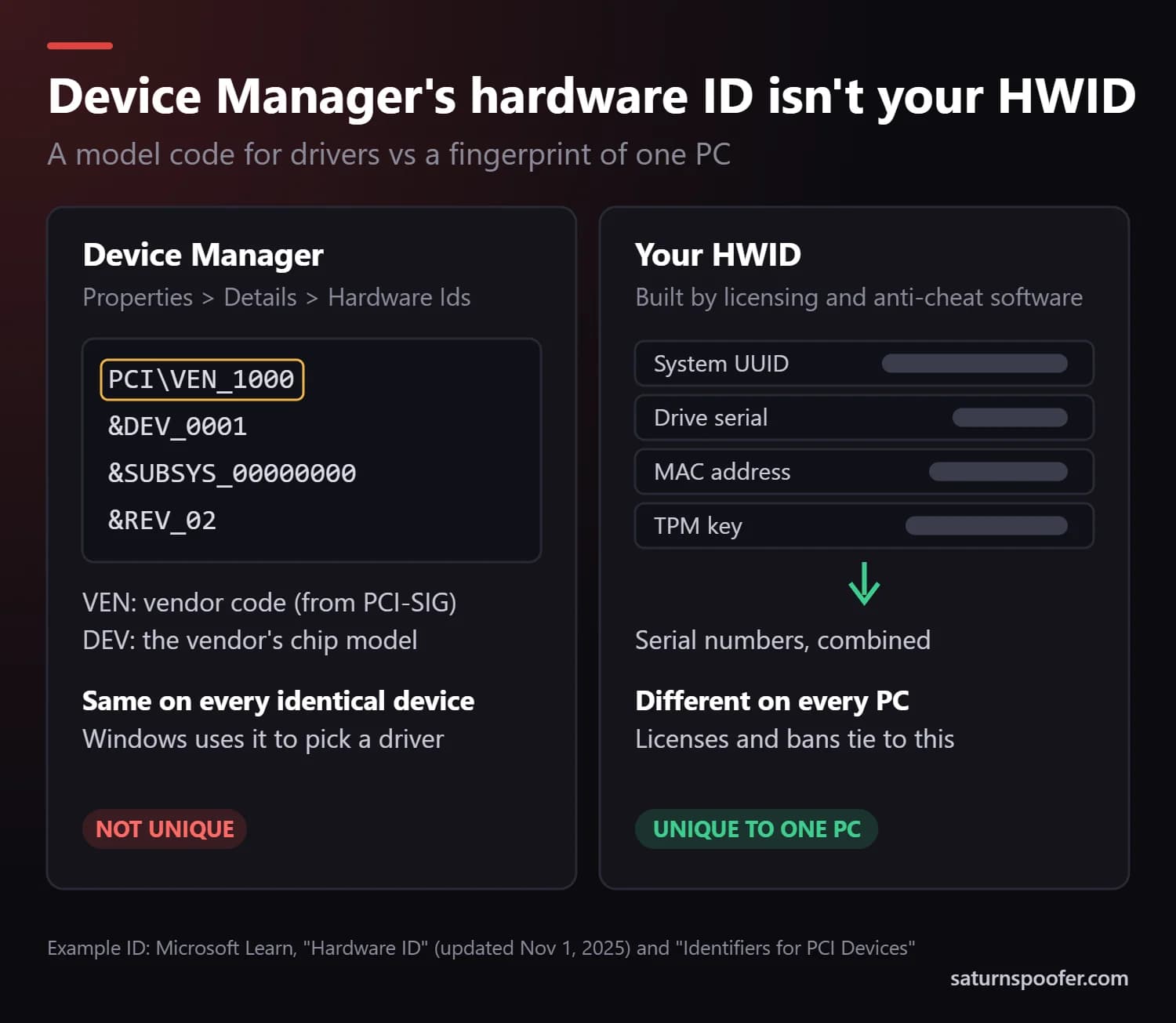
So when a guide tells you to open Device Manager, pick a device and copy its Hardware Ids from the Details tab to "find your HWID", it's showing you driver information. That helps you track down the right driver. It tells you nothing about the identity of your specific machine, which is what a license or a ban is tied to.
How to Check Your HWID in Windows
You can check the parts of your HWID in Windows 10 or 11 with PowerShell, which comes with Windows, so there's nothing to download. Each command below reads one identifier:
- Press the Windows key, type
PowerShelland press Enter. - For the system UUID, run
Get-CimInstance Win32_ComputerSystemProduct | Select-Object UUID. It returns a 36-character value in five groups. - For the motherboard and BIOS serials, run
Get-CimInstance Win32_BaseBoard | Select-Object SerialNumber, thenGet-CimInstance Win32_BIOS | Select-Object SerialNumber. - For your drive serials, run
Get-PhysicalDisk | Select-Object SerialNumber. You get one line per drive. - For your MAC addresses, run
Get-NetAdapter -Physical | Select-Object Name, MacAddress.
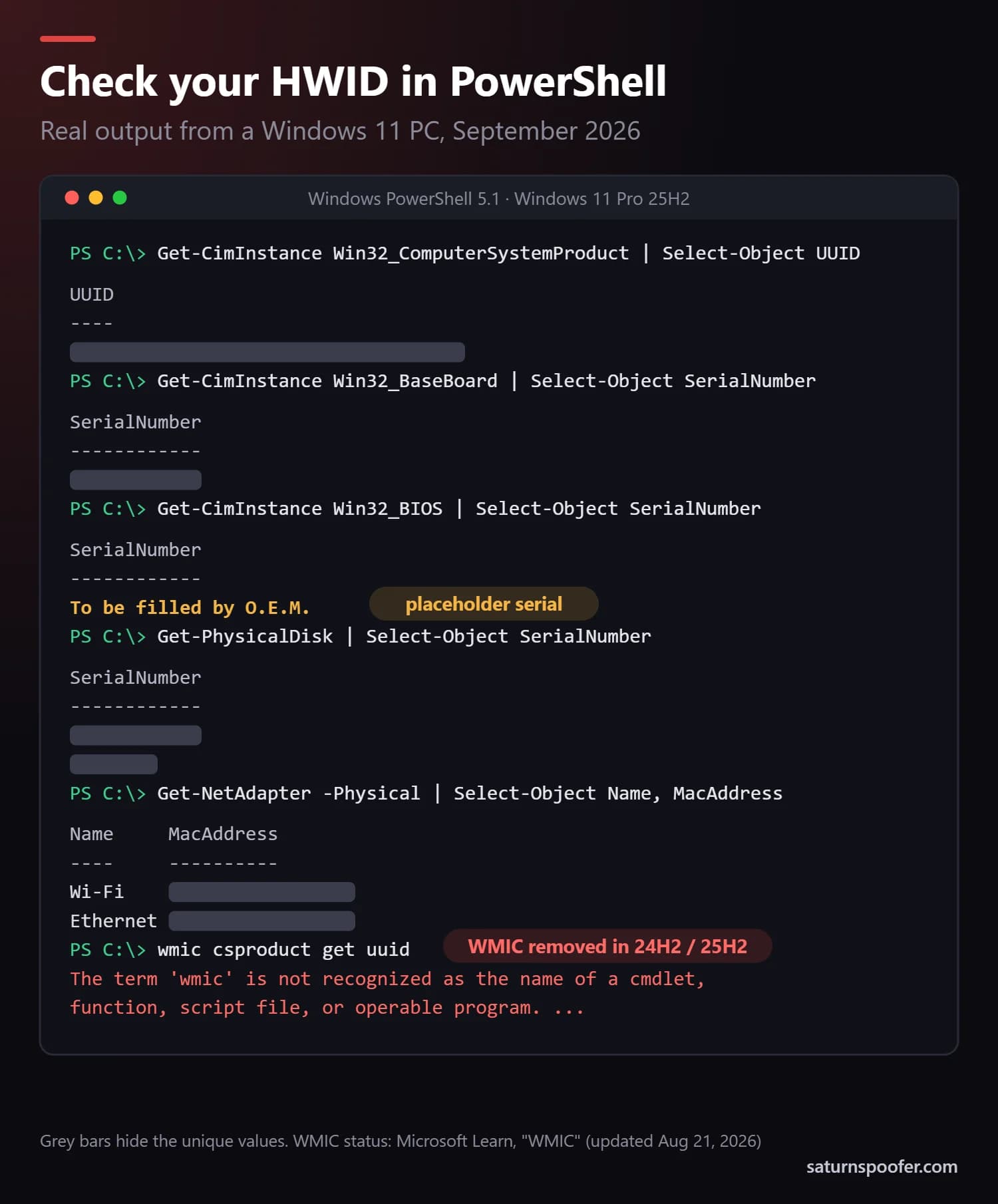
Real PowerShell output from a Windows 11 Pro 25H2 PC in September 2026, redrawn with the unique values hidden.
None of these commands needed an administrator window on our test PC, and there's no reason to paste what they return into a forum. Older instructions will steer you wrong in two places. Guides that have you type wmic csproduct get uuid into Command Prompt are out of date. Microsoft says that starting in August 2026, Windows 11 versions 24H2 and 25H2 no longer include WMIC, and it can't be added back. On our 25H2 test machine the command came back "not recognized". Guides using Get-WmiObject are dated too, since Microsoft superseded it with Get-CimInstance in PowerShell 3.0.
Can a Website See Your HWID?
No. A website can't see your HWID, because browsers don't give web pages access to the serial numbers in your motherboard, drives or network adapters. The one narrow exception is USB: in browsers that support WebUSB, a page can read a USB device's serial number only after you choose that device in the browser's own pairing prompt, as MDN's WebUSB reference explains.
Programs you install are another matter. A normal program running on Windows can read the same identifiers the PowerShell commands above return, which is how anti-cheat and licensing software build an HWID in the first place. There's no genuine online HWID checker for the same reason. A site that claims to show yours is reading details from your browser instead. A downloadable "HWID checker" is a program reading the same identifiers, and the built-in commands do that without installing anything from an unknown source.
Your Wi-Fi adapter is one part of your hardware that can be noticed from outside the PC. Microsoft notes that shops and other public places might use your Wi-Fi MAC address to follow your movement, which is why Windows offers random hardware addresses for Wi-Fi.
What Is an HWID Used For?
An HWID is used whenever software has to recognize one computer rather than one person or one login. It has four common jobs:
- Some software sellers lock a license key to a PC's HWID so one key activates on one machine only.
- Windows 11 attaches its digital license to your device's hardware, and Microsoft's guide to reactivating Windows after a hardware change says that replacing the motherboard means reactivating.
- Anti-cheat systems ban the PC itself. Riot Games describes an HWID ban as banning "the physical components of that computer rather than just banning an account" in its HWID ban article.
- Company IT teams use the same serials to keep an inventory of their PCs and to notice when a machine has been swapped.
What Changes Your HWID?
Your HWID changes only when the identifiers behind it change, and most everyday fixes don't touch them. A reinstall, a new drive and a VPN all do different things:
| Change | What it affects | New HWID? |
|---|---|---|
| Reinstall or reset Windows | No hardware serials | No |
| New SSD or hard drive | That drive's serial | Partly |
| New network card | That card's MAC address | Partly |
| New motherboard | System UUID and board serials | Yes |
| VPN or new router | Your IP address only | No |
"Partly" means one input changed. Whether the software now treats the machine as a new PC depends on how it weighs that input against the rest.
A reinstall is the fix people try first, and it does nothing to a serial-based HWID, because the UUID and drive serials are stored in firmware that a Windows install never touches. Riot says as much about its own bans: neither deleting the account that earned an HWID ban nor putting the game back on the PC removes it. The motherboard is the swap that counts, which is also why Windows asks you to reactivate after one.
HWID vs MAC Address vs IP Address
An HWID, a MAC address and an IP address identify three different things: the whole computer, one network adapter and your internet connection. They get mixed up because all three come up in conversations about bans and privacy.
| Identifier | What it identifies | Changes when |
|---|---|---|
| HWID | The PC, from several serials | You replace core parts |
| MAC address | One network adapter | You swap the adapter or randomize Wi-Fi |
| IP address | Your internet connection | You change networks or use a VPN |
A MAC address can be one of the inputs to an HWID, which is where the overlap comes from, but it's only one. An IP address isn't part of an HWID at all. It belongs to your connection, so a VPN changes it without touching anything inside the PC.
What Is an HWID Ban?
An HWID ban blocks a computer from a game instead of blocking one account, so making a new account on that computer doesn't get you back in. In Riot's games, which run the Riot Vanguard anti-cheat, every login on a hardware-banned PC returns the VAN 152 error, and Riot says any other account used on that machine gets banned for a set period too, because its system assumes that account is trying to dodge the first ban.
How long an HWID ban lasts, and whether an appeal can lift it, depends on the game. Our guide to how an HWID ban works covers the general case, and there are game-specific guides for a Valorant HWID ban and a League of Legends HWID ban.
Can You Change Your HWID?
You can change your HWID in two ways: replace the hardware the identifiers come from, or run an HWID spoofer that hands software different values while the hardware stays put. New parts cost real money and only change the identifiers on the parts you replace, and changing the main ones means a new motherboard and new drives.
A spoofer works in software, at the point where programs ask Windows for those serials. Our explainer on how an HWID spoofer works covers the mechanics, and the guide to temporary and permanent spoofers compares the two approaches.
Changing an identifier isn't strange in itself, since Windows can randomize your Wi-Fi MAC address on its own. The risk comes from why you do it. Using a spoofer to keep playing a game that banned your PC is where the trouble starts. Riot's Terms of Service, for example, forbid circumventing any technical measure it uses to control access to its games, and Riot also bans other accounts caught logging in from that PC.
Saturn's HWID spoofer changes these same identifiers, from motherboard and drive serials to MAC addresses, the TPM, the graphics card and the monitor's EDID. It runs from a single loader, your license decides which anti-cheat systems it handles, and there's a 24-hour free trial that only asks for an email address.
HWID FAQ
Is your HWID unique?
Your HWID is unique in practice, because it combines identifiers that are meant to be unique to one PC, such as the 128-bit system UUID, drive serials and the TPM's endorsement key. Single inputs can repeat, though: identical CPUs report the same ProcessorId, and some motherboards ship with placeholder serials like "To be filled by O.E.M."
Does reinstalling Windows change your HWID?
No, reinstalling Windows doesn't change your HWID, because the serial numbers it's built from are stored in firmware on the motherboard and in the drives themselves. For the same reason, a clean install won't clear an HWID ban.
Does a VPN change your HWID?
No, a VPN doesn't change your HWID. A VPN only changes the IP address that websites and game servers see, and your HWID comes from the serials inside the PC, which a VPN never touches.
Is it safe to share your HWID?
There's no reason to post your HWID publicly. Most of its serials can't be changed without new hardware, so once they're out, they stay tied to your PC. If a support team needs them, send them through an official ticket rather than a public forum or chat.
Can you get in trouble for changing your HWID?
You can if you change it to get around a ban. Changing an identifier is ordinary enough that Windows will randomize a Wi-Fi MAC address for you if you turn the setting on. The trouble comes from the ban itself. Riot, for one, treats a login from a PC under an HWID ban as an attempt to circumvent it and bans that account for a set period.
What does "HWID activation" mean?
"HWID activation" is a nickname for the Windows digital license, the activation Microsoft ties to your PC's hardware. Unofficial scripts that borrow the name aren't made by Microsoft.