A BIOS serial number is the serial string your PC's firmware reports to Windows through the Win32_BIOS class, and in September 2026 the way to read it is PowerShell, not WMIC. Microsoft stopped shipping the old wmic tool with Windows 11 versions 24H2 and 25H2 in August 2026, so the command most guides still print now fails with "not recognized". The PowerShell line below reads the same value in one step.
The top-ranking guides we checked for this search still lead with the WMIC line. Everything here follows what Microsoft documents today, and each old WMIC variant is mapped to the command that replaces it.
How to Find Your BIOS Serial Number in PowerShell
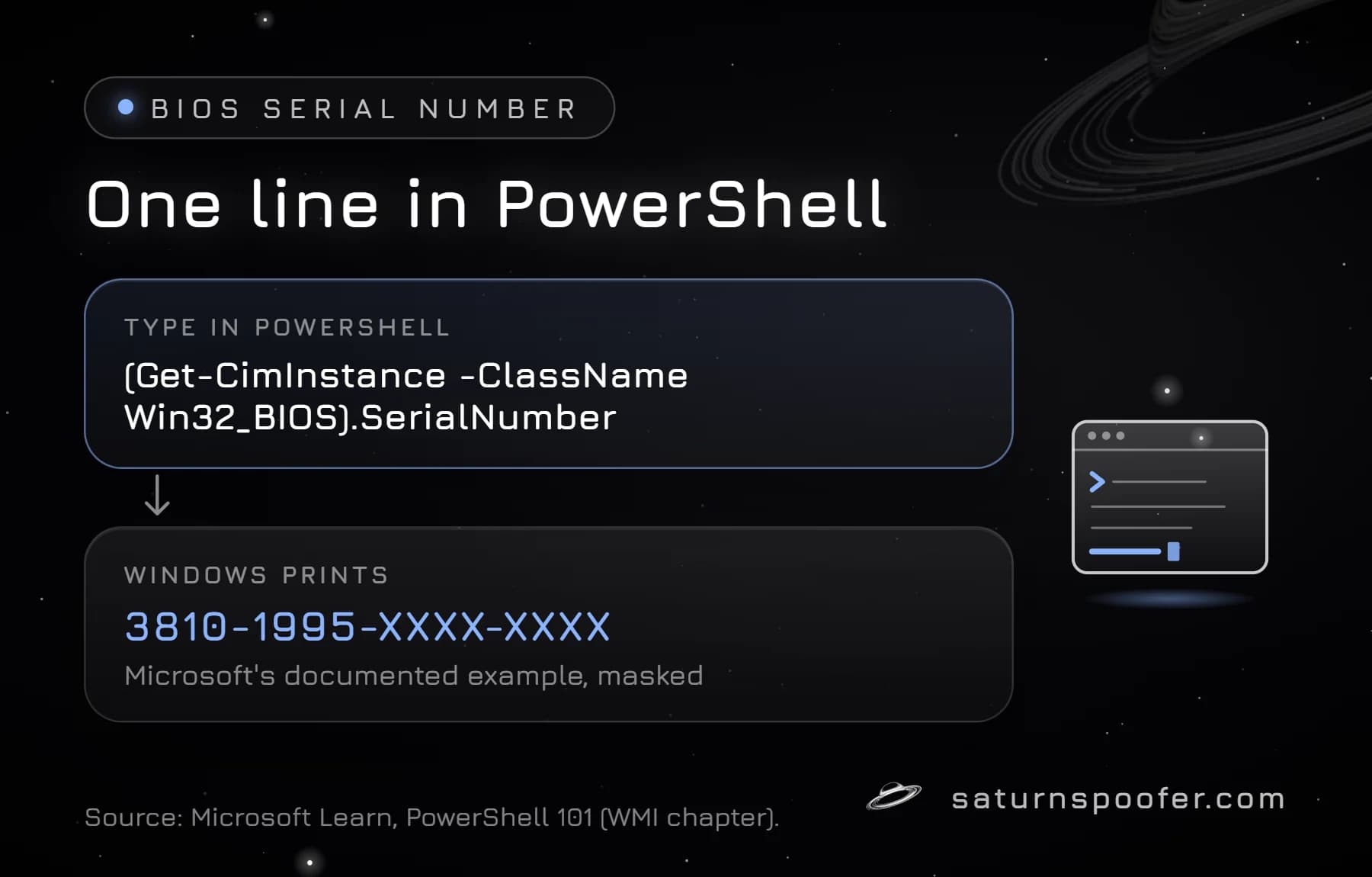
The BIOS serial number sits in the SerialNumber property of the Win32_BIOS WMI class, and PowerShell's CIM cmdlets read it directly. Open Windows PowerShell or Windows Terminal and run one of these. All three come from Microsoft's PowerShell 101 chapter on WMI:
Get-CimInstance -ClassName Win32_BIOS | Select-Object -Property SerialNumberprints a small table with aSerialNumberheader and the value under it.(Get-CimInstance -ClassName Win32_BIOS).SerialNumberprints the bare string. Use this one in scripts.Get-CimInstance -ClassName Win32_BIOSwith no filter shows the serial next to the BIOS maker, the SMBIOS BIOS version and the version string.
Microsoft's example output shows a vendor-style serial such as 3810-1995-XXXX-...; yours can look completely different, because the PC maker decides the format. Adding -Property SerialNumber to Get-CimInstance makes the query fetch only that one field, which Microsoft recommends once you start querying other machines.
Windows PowerShell 5.1 still has two older routes. Get-WmiObject Win32_BIOS reads the same class, but Microsoft removed Get-WmiObject from PowerShell 7, so new scripts should use Get-CimInstance. And Get-ComputerInfo exposes the value as a property Microsoft spelled BiosSeralNumber, missing "i" included, so look for that spelling rather than the obvious one.
Get the BIOS Serial Number From CMD Without WMIC
A BIOS serial number lookup from Command Prompt now goes through PowerShell, the tool Microsoft names as the replacement for wmic bios get serialnumber and every other WMIC query. Type this at the cmd prompt:
powershell -Command "(Get-CimInstance -ClassName Win32_BIOS).SerialNumber"
cmd starts powershell.exe, runs that one query and prints the answer in the same window. A batch file that used to call WMIC can take the same line.
Every WMIC BIOS Serial Number Command, and What Replaces It
The WMIC BIOS serial number commands below come from the Windows 10 and early Windows 11 era, and on a current Windows 11 install each one stops at "'wmic' is not recognized". The switch meanings come from Microsoft's WMIC reference; the right column is the CIM command to run instead.
| Legacy WMIC command | Run this instead |
|---|---|
wmic bios get serialnumber |
Get-CimInstance -ClassName Win32_BIOS | Select-Object -Property SerialNumber |
wmic bios get serialnumber /value |
Get-CimInstance -ClassName Win32_BIOS | Select-Object -ExpandProperty SerialNumber |
wmic path win32_bios get serialnumber |
Get-CimInstance -Query 'Select * from Win32_BIOS' |
wmic /node:PC01 bios get serialnumber |
Get-CimInstance -ComputerName PC01 -ClassName Win32_BIOS |
wmic csproduct get identifyingnumber |
Get-CimInstance -ClassName Win32_ComputerSystemProduct -Property IdentifyingNumber | Select-Object -Property IdentifyingNumber |
wmic baseboard get serialnumber |
Get-CimInstance -ClassName Win32_BaseBoard | Select-Object -Property SerialNumber |
In WMIC, /value printed each property on its own line as name and value, path skipped the friendly alias and queried the WMI class by name, and /node: sent the query to other computers. The remote CIM version needs rights on the target machine: Microsoft's PowerShell 101 example shows "Access is denied" until you open a New-CimSession with a credential. The last two rows read the BIOS serial's neighbors: the product serial, which Microsoft maps to the same field, and the board serial, a separate number. The section on the three serials below sorts them out.
Is WMIC Removed in Windows 11?
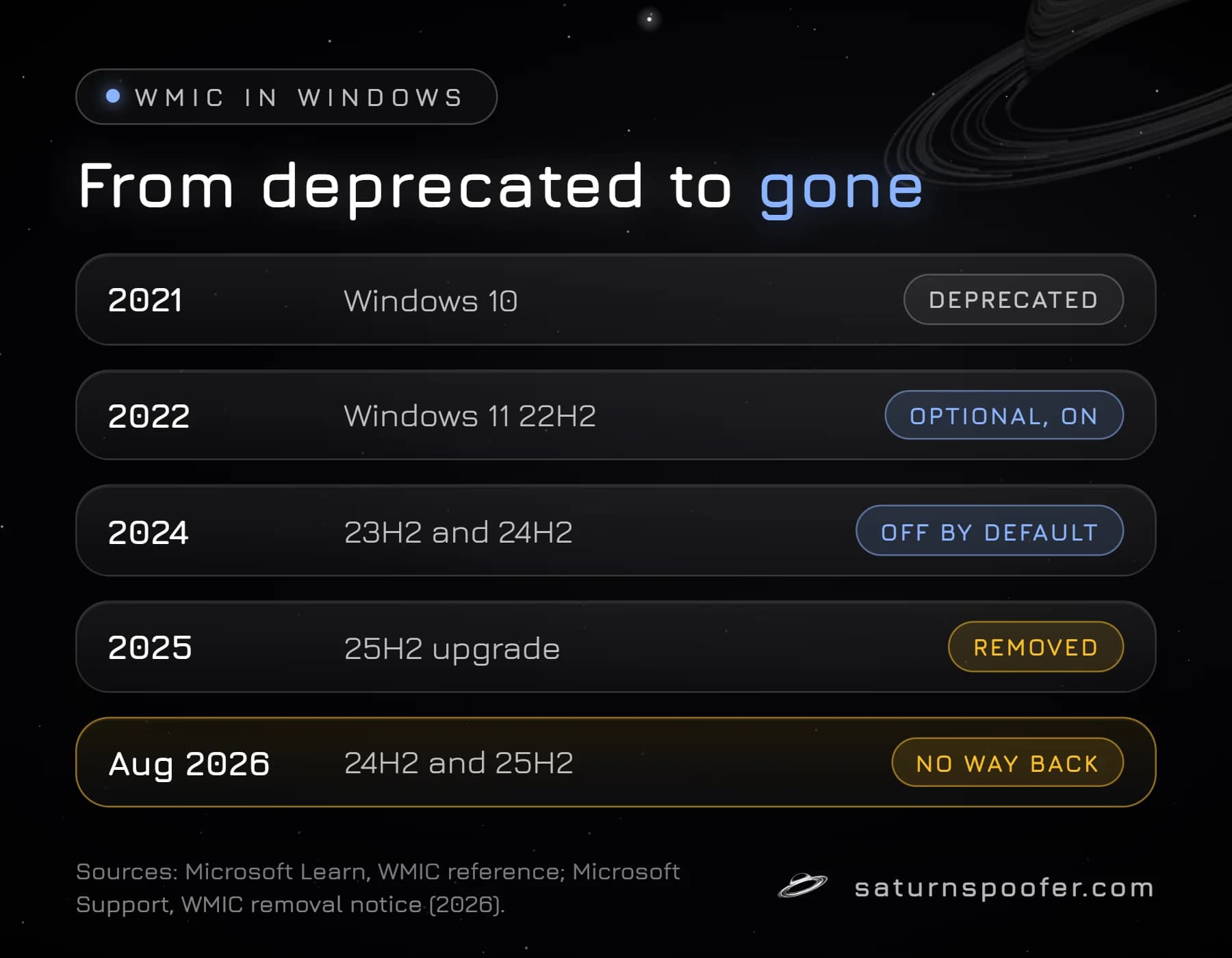
Yes, WMIC is removed from Windows 11. Microsoft deprecated the tool in 2021, turned it into an optional Feature on Demand, and since August 2026 the tool is missing from 24H2 and 25H2 with no way to reinstall it. Microsoft's WMIC reference page and its removal notice give this timeline:
| When | Windows release | WMIC status |
|---|---|---|
| 2021 | Windows 10 | Deprecated |
| 2022 | Windows 11 22H2 | Optional feature, on by default |
| 2024 | Windows 11 23H2, 24H2 | Off by default, can be added |
| 2025 | Windows 11 25H2 | Removed on upgrade, can be added back |
| August 2026 | Windows 11 24H2, 25H2 | Gone, cannot be added back |
| 2026 | Windows 11 26H1 | Removed, no optional feature |
Only the command-line tool is gone. The data is not. Microsoft says the Windows Management Instrumentation infrastructure underneath stays a core part of Windows and is unaffected, which is why every Get-CimInstance line in the table above still works.
Why Your BIOS Serial Number Shows an OEM Placeholder
A BIOS serial number only holds a real value if the company that built the PC wrote one into the firmware. On brand-name desktops and laptops, the maker normally stores the same serial that is printed on the label. On a PC you assembled yourself there is no system maker, so the field can come back empty or holding placeholder text along the lines of "To Be Filled By OEM", which users on Microsoft's Q&A forum report finding in that field. How-To Geek puts it plainly: a self-built PC has no system serial of its own, although the motherboard and each part still carry theirs.
A placeholder string is identical on every PC that carries it, so it identifies nothing. That is where the serial number of the motherboard earns its place, because the board carries its own number from its maker no matter what the system serial field says. One older meaning of "BIOS serial number" has nothing to do with any of this: on 1990s and early 2000s Award and AMI firmware, the long code on the boot screen encoded the chipset and board maker, not a unique serial.
BIOS Serial vs Motherboard Serial vs System UUID
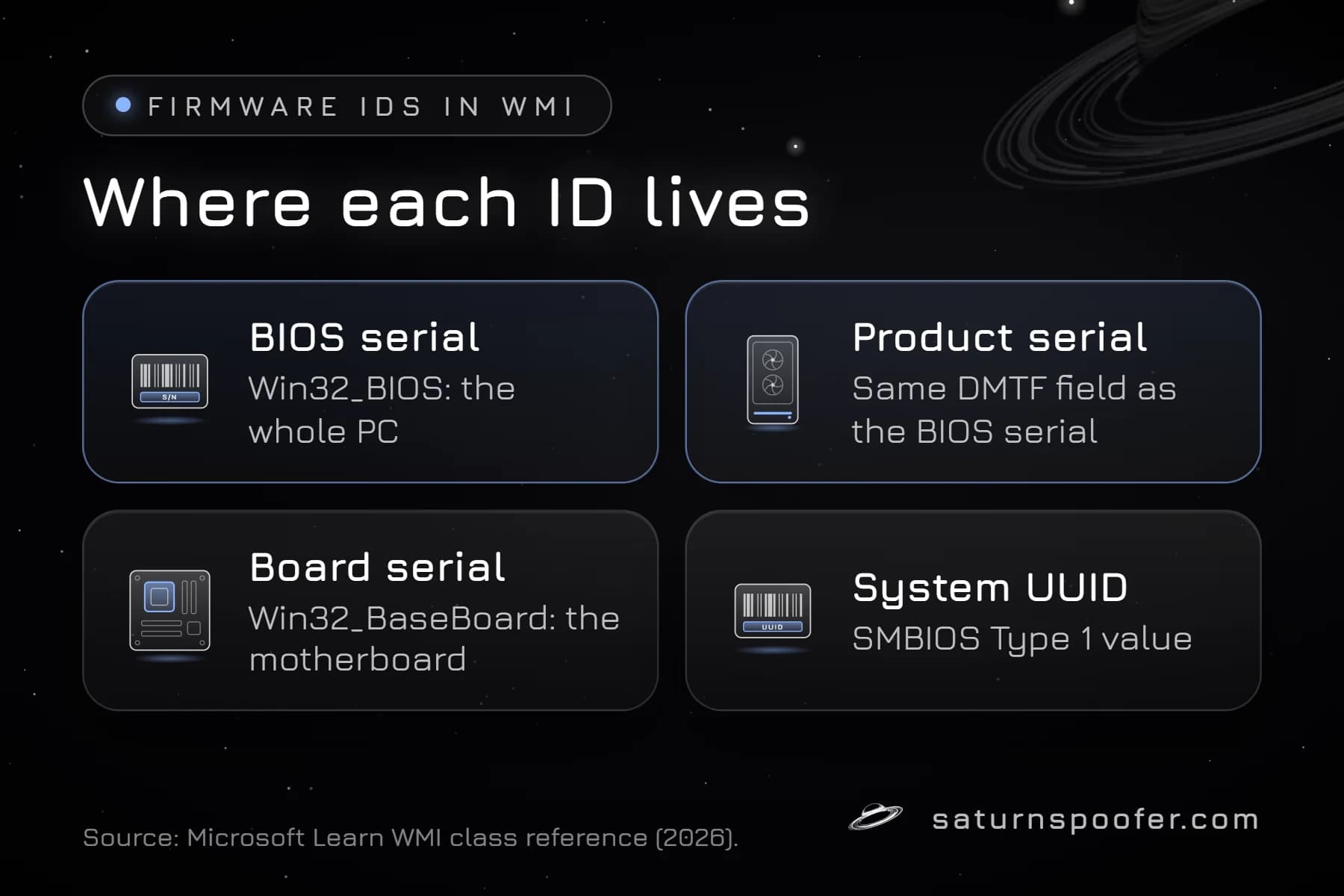
The BIOS serial number sits next to two other firmware identifiers in WMI: the board serial and the system UUID, which Windows takes from SMBIOS, the table the firmware publishes at boot. Each has its own WMI class and its own job:
| Identifier | Where Windows reads it | What it identifies |
|---|---|---|
| BIOS serial | Win32_BIOS SerialNumber |
The whole PC, as set by its maker |
| Product serial | Win32_ComputerSystemProduct IdentifyingNumber |
The same PC-level serial field |
| Board serial | Win32_BaseBoard SerialNumber |
The motherboard itself |
| System UUID | Win32_ComputerSystemProduct UUID |
The PC, as a 128-bit ID |
Microsoft's class documentation maps the BIOS SerialNumber and the product IdentifyingNumber to the same DMTF component ID field, entry 001.4. The board serial is a separate number that the motherboard maker assigns, and the system UUID comes from the System Information structure in SMBIOS.
Why Anti-Cheat Software Reads the BIOS Serial Number
A BIOS serial number is one of the firmware values commonly read when software builds a fingerprint of a PC, and it lives in firmware rather than in Windows. Microsoft notes that the Win32_BIOS values drawn from SMBIOS should stay the same even when the boot mode changes between legacy BIOS and UEFI. Combined with disk, network and board identifiers, it becomes one piece of the PC's hardware ID (HWID).
Game publishers keep their detection lists private, so nobody outside those studios can say that a given game checks the BIOS serial specifically. What is on record is how the result gets used: when an anti-cheat blocks the machine instead of an account, it is one of the hardware bans that follow a player to every fresh account on that PC.
Can You Change a BIOS Serial Number?
A BIOS serial number is written into the firmware by the PC maker, so you cannot change it from Windows settings, PowerShell or cmd: the Win32_BIOS documentation lists SerialNumber as read-only. Because Windows reads the number from firmware, a clean Windows install should leave it where it was, and so should most driver or software changes.
What can be changed is what the PC reports. Firmware tools and software that alters the reported values each have trade-offs, laid out for anyone who wants to change your HWID on every component at once. Saturn, an HWID spoofer built for Windows, publishes a spoof list that covers the motherboard and its SMBIOS identifiers, the group the BIOS serial belongs to, plus the CPU, disks, GPU, RAM, monitor, MAC address and TPM. Running a spoofer lifts the HWID ban from your PC's side, yet the banned account itself stays banned. Epic Games also warns that it can detect tools that mask or alter a PC's hardware identifiers, and that a Fortnite account which keeps such a tool installed may be permanently banned, so weigh that before trying it on any game.
BIOS Serial Number FAQ
What is the command to get the BIOS serial number?
On current Windows the command is (Get-CimInstance -ClassName Win32_BIOS).SerialNumber in PowerShell. The old wmic bios get serialnumber only works where WMIC is still installed, which is no longer the case on Windows 11 24H2 and 25H2 since August 2026.
Why does wmic bios get serialnumber not work?
The wmic tool is no longer part of current Windows 11 releases, so cmd reports that it is not recognized. The data is still there: the PowerShell Get-CimInstance commands read the same WMI class.
Is the BIOS serial number the same as the motherboard serial number?
No. The BIOS serial number describes the whole PC and is set by the system maker, while the motherboard serial comes from Win32_BaseBoard and is set by the board maker. On a self-built PC the BIOS serial can be a placeholder while the board serial is a real number.
Does the BIOS serial number change?
Not on its own. It lives in firmware, not in Windows, so reinstalling Windows or changing settings should leave it as it is. A motherboard replacement is the case to watch: the new board may report a different serial unless the repair shop writes the original back.
Where else can I find the serial number?
Check the label on the case or the underside of a laptop, the original box, or the firmware setup screen, which often lists it on the main or system information page. These all show the maker's serial, which is the same number PowerShell reads when the maker stored it.