
Enabling HVCI
Follow these simple steps to enable Memory Integrity (HVCI) on your Windows system
Important Note
Enabling Memory Integrity requires a system restart. Save all your work before proceeding with these steps.
1Open Windows Security
Press the Windows key, type "Windows Security", and open the application. Then click on "Device security" in the left sidebar.
2Open Core Isolation Details
Under the "Core isolation" section, click on "Core isolation details" to access the Memory integrity settings.
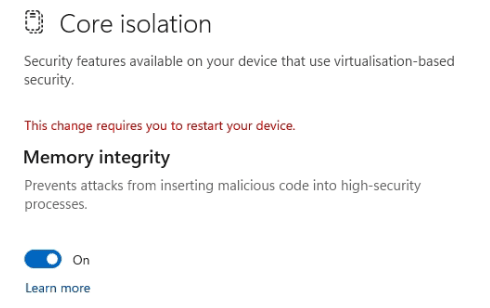
3Enable Memory Integrity
Toggle the "Memory integrity" switch to On. This prevents attacks from inserting malicious code into high-security processes.
4Restart Your Computer
Click the Start menu, click the Power icon, and select "Restart" to apply the changes.